On-device AI grew eyes: Apple's 2026 model framework
Apple's on-device model now takes images, calls Vision tools, and runs behind one API that swaps to Claude or Gemini - free, private, on the phone.
5 min read
Apple's 2026 Foundation Models framework did two things that change what an iPhone app can do without a server: the on-device model now accepts images, and any model - Apple's own, Claude, or Gemini - can sit behind one Swift API. The headline is multimodal: your app can hand the on-device model a screenshot, a photo, or a scanned page and have it reason about the pixels, all locally and free. The quieter but bigger shift is the abstraction layer, which lets you write against one LanguageModelSession and swap the model underneath. Together they make "add a genuinely useful, private AI feature" a normal iOS task rather than a cloud project.
Why this matters now
For a year, on-device AI on iPhone was text-only and modest. As of WWDC 2026 that changed. The third generation of Apple's models (AFM 3) is a five-model lineup, and the on-device Core is a 20-billion-parameter sparse model that activates only 1-4 billion parameters per prompt - big enough to be useful, small enough to run on the phone. It carries a 4K-token budget on-device (32K when it routes to Private Cloud Compute), and crucially the on-device System Language Model was rebuilt to accept images directly in the prompt (Apple, WWDC 2026).
The economics are the part product teams should notice: calling the on-device model is free, runs offline, and keeps data on the device. A meaningful slice of in-app AI - structured extraction, classification, summarization, tool routing - now has no per-request bill and no privacy review attached to shipping user data to a server.
What actually changed
Two additions, both concrete.
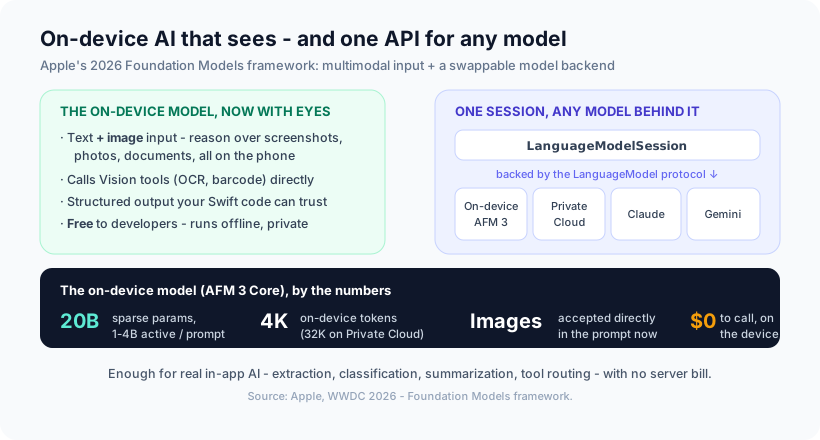
1. Multimodal input, on-device. You can now pass images alongside text, so an app can identify objects, read text out of a photo, or understand a screenshot without a network call. Apple also exposed Vision framework tools - OCR, barcode reading - that the model can call directly, so the model orchestrates the vision work rather than you wiring it by hand.
2. One API, any model. The framework is built around a new LanguageModel protocol: a single LanguageModelSession can be backed by the on-device model, Apple's Private Cloud Compute, or a third-party model like Claude or Gemini. A Python SDK gives access to the same on-device models outside Swift. The practical effect is you design the feature once and choose the model per task - on-device for the private, cheap, offline path; a bigger model only where the task genuinely needs it.
The interesting line isn't "the phone has an LLM now." It's that the cheapest, most private option - the on-device model - is now good enough to be your default, and you only reach past it when a task truly demands more.
Where the on-device model fits (and where it doesn't)
The honest framing is about matching the task to the tier:
- On-device model is the right default for bounded, structured, latency-sensitive, or privacy-sensitive work: pulling fields out of a receipt photo, tagging and classifying content, summarizing text the user already has, routing a request to the right in-app action. Free, offline, private.
- Reach for a larger model (Private Cloud Compute or a hosted one via the same API) when the task needs long context beyond the 4K on-device budget, broad world knowledge, or heavier reasoning. The abstraction means that's a config choice, not a rewrite.
The failure mode is treating every AI feature as a job for the biggest model available - which is how you end up with a server bill, a latency problem, and a privacy questionnaire for something the phone could have done for free. This is the same argument we've made about not defaulting to a frontier model: right-size the model to the job.
Our opinion
Our take: for most in-app AI features on iOS, the on-device model should be the first thing you try, not the fallback. The combination of image input, free calls, and offline privacy clears the bar for a large category of features that previously "needed" a cloud model. Teams that start on-device ship faster, cheaper, and with a privacy story that's structural rather than promised - and they only pay for a bigger model on the specific tasks that earn it.
We'd add that the model-abstraction layer is the underrated piece. It means you can build the feature now against the on-device model and later route the hard cases elsewhere without touching your app's logic - the kind of decision that ages well. It fits how we already think about shipping private, on-device features as the default and treating the cloud as the exception.
How Ashvara helps
We build iOS apps in SwiftUI, and putting AI on-device well is squarely our work: picking the features that genuinely fit the on-device model, wiring multimodal input and Vision tools, and using the abstraction layer to route only the hard cases to a bigger model - so you get a useful AI feature that's fast, private, and cheap to run. No server you didn't need, no data leaving the phone that didn't have to.
If you want an AI feature in your iOS app built on-device-first, that's our iOS development and AI solutions work. Talk to us and we'll help you ship it without renting a cloud model to do what the phone already can.
Source: Apple - What's new in the Foundation Models framework (WWDC 2026) and Introducing the third generation of Apple's Foundation Models.