Apple's on-device AI is now an API
The Foundation Models framework gives any iOS app a ~3B-parameter model for free - no key, no network, no per-token cost. Here's the architecture that follows.
7 min read
Every recent iPhone now ships a capable language model that your app can call directly - no API key, no network round-trip, no per-token bill. Apple's Foundation Models framework exposes the same ~3-billion-parameter on-device model that powers Apple Intelligence as a plain Swift API, and at WWDC 2026 Apple both added image input and opened the framework so a cloud model can be swapped in behind the same interface. For a large class of in-app AI features, the barrier to entry in 2026 is roughly three lines of Swift and zero dollars. That changes the right way to architect the feature.
Why this matters now
On-device AI used to mean "ship and quantize your own model, and good luck." Now the model is part of the OS. Apple's own technical report puts real numbers on it: the on-device model is about 3 billion parameters, compressed to roughly 2 bits per weight using quantization-aware training, with a footprint near 1 GB, and it supports tool calling and 15+ languages. Quantization costs some accuracy - Apple reports MMLU dropping from 67.8 to 64.4 on-device - but the trade is enormous gains in memory and speed for a model that runs entirely on the phone.
The 2026 additions matter for product design, not just benchmarks. Image input means the on-device model can caption a photo, read a receipt into structured fields, or classify what's on screen without a single byte leaving the device. And WWDC 2026 session 339 introduced a provider protocol: the same call site can target the built-in model or a conforming cloud model, so "on-device vs cloud" becomes a configuration decision rather than a rewrite.
The architecture that follows: hybrid
Free, private, and offline is a fantastic default - but a 3B model is not a frontier model. The design question for every AI feature becomes: does this task actually need the big model?
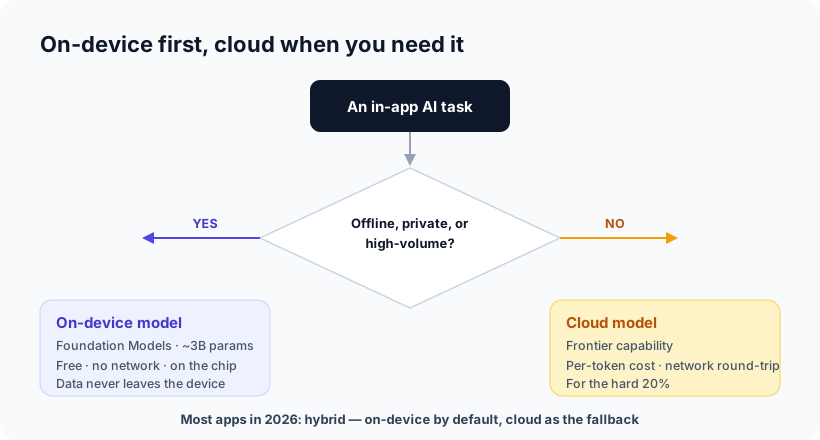
The honest rule of thumb: route the common, structured work on-device and reserve the cloud for genuine reasoning. The on-device model is strong at exactly the tasks most apps actually need:
- Structured extraction - pull totals and dates off a receipt, turn a note into fields
- Classification and routing - tag, sort, or decide which action a request maps to
- Summarization of on-screen or in-app content
- Tool calling - deciding which of your app's functions to invoke, with arguments
It's the wrong tool for long-form reasoning, deep world knowledge, or anything needing the latest facts. That's where a cloud model - Apple's server model, or your own via the new provider protocol - earns its per-token cost.
The best on-device task is one the user never knew ran a model. No spinner, no network error, no "this feature needs a connection" - it just works, instantly, on the plane.
What people are already shipping
You don't have to imagine the use cases - real apps shipped them within months of the framework's release. A sample from Apple's own roundup:
| App | What the on-device model does |
|---|---|
| Signeasy | Summarizes a contract, highlights key points, answers questions about the document |
| Agenda | "Ask Agenda" answers questions across your notes in plain language, with links back |
| OmniFocus | Generates projects and next steps, suggests and auto-fills tags |
| Grammo | A grammar tutor that explains why an answer was wrong and generates fresh questions |
| Detail | Turns a rough outline into a ready-to-record teleprompter script |
Notice the pattern: every one is a bounded task over the user's own content - summarize this, extract that, answer questions about notes already on the device. That's not a coincidence. It's the exact shape of task the on-device model is good at. Other shipped examples run the same way: student quiz generation, workout-summary insights, customized children's stories.
What it's great at - and where it struggles
The model is improving fast - Apple's 2026 on-device model is a 20-billion-parameter sparse design that activates only a few billion parameters per prompt (keeping a small compute cost), and Apple reports user preference for it climbing from 23.3% to 45.6%, with overall satisfaction up about 36% (Apple ML Research). But "better" is not "unlimited." The honest capability map matters more than any benchmark:
| Great at - keep it on-device | Struggles - send it to the cloud |
|---|---|
| Summarizing a note, email, or document | Reasoning over long documents |
| Pulling structured fields out of text or a photo | Deep world knowledge or current facts |
| Classifying, tagging, and routing | Open-ended, multi-turn chat |
| Choosing which app function to call (tool calling) | Anything needing a large context |
The single most important limit to design around is the context window: about 4,096 tokens - roughly 3,000 words shared across your prompt, the user's content, and the answer (InfoQ). It fills up fast, which is exactly why the successful apps do one bounded thing well and the frustrating ones tried to be a general chatbot.
Apple learned this in public. Its own notification-summaries feature - an unbounded, nuance-heavy task - was widely mocked (one summary compressed "Thinking of you" into "Expresses feelings"), and Apple pulled back and added clearer labeling after complaints. The lesson isn't "the model is bad." It's that a small model aimed at an open-ended task disappoints, while the same model aimed at a bounded task delights.
Two techniques close much of the gap:
- Pair the model with deterministic tools. Don't let it guess digits off a blurry receipt - have it call an OCR tool and reason over the exact text. Model-plus-tools is the most reliable way to ship an AI feature.
- Constrain the output. Apple's "guided generation" makes the model fill a structure you define, which prevents a whole class of malformed or hallucinated results before they happen.
Our opinion
We've argued for a while that on-device AI is quietly winning, and this is the moment the argument stops being philosophical. When the model is free, offline, and private by construction, the economics flip: the question is no longer "can we afford to add AI here?" but "is there any reason to send this to a server?"
Our take is that most teams should treat on-device as the default and the cloud as the exception - not the other way around. It's better for privacy (data that never leaves the phone can't leak), better for cost (no per-token meter on your most common actions), better for reliability (no network dependency for core features), and often better for latency. Reach for the cloud deliberately, for the specific tasks that need it, behind a clear fallback. The mistake we'd caution against is the reverse: piping every keystroke to a cloud model out of habit, paying for capability the task never needed and handing user data to a server for no reason.
There's a real constraint to plan around: the framework needs Apple-silicon devices with Apple Intelligence, so you design a sensible fallback for older hardware. That's ordinary progressive enhancement - the same discipline good mobile teams already apply to any capability that isn't universal.
How Ashvara helps
On-device is not a bolt-on for us - it's how we've built apps like Cull and SafeBite, where the whole point is that your photos and your health data never leave your phone. We know where the on-device model shines, where it quietly falls down, and how to design the hybrid fallback so users never hit a wall.
If you're planning an AI feature for an iOS app, the framing matters more than the model: get the on-device/cloud split right and you ship something faster, cheaper, and more private than the default. That's the conversation we have on every iOS build. Tell us what you're building and we'll map which parts belong on the device.
Sources: Apple Machine Learning Research - Foundation Models tech report 2025 and third-generation models; Apple - apps using the Foundation Models framework; Foundation Models framework docs; WWDC 2026 session 339; InfoQ - context window management; TechCrunch - notification summary complaints.